|
-
9th April 06, 12:58 PM
#1
The kilted superhero
Found this site and it was a fantastic waste of time. I highly recomend it-you can generate your very own superhero. http://www.ugo.com/channels/comics/h...ne/classic.asp
This one is mine! AAARgghhgh!!

-
-
9th April 06, 01:28 PM
#2
Hey, that's actually really cool. Too bad the only way to get a digital version is a screen capture. Thanks for the link.
-
-
9th April 06, 03:02 PM
#3
his kilt seems a bit short for a superhero
-
-
9th April 06, 03:23 PM
#4
that site is EVIL....wasted too much time already on it...
-
-
9th April 06, 03:29 PM
#5
What steps did you take to save the pic and load it here?
An uair a théid an gobhainn air bhathal 'se is feàrr a bhi réidh ris.
(When the smith gets wildly excited, 'tis best to agree with him.)
Kiltio Ergo Sum.
I Kilt, therefore I am. -McClef
-
-
9th April 06, 03:50 PM
#6
 Originally Posted by Nick
What steps did you take to save the pic and load it here?
Looks like he's not on line right now, so I'll throw in my .02...
First thing, grab a screen shot; I have Ifranview, and use the "Capture" function under "Options". That'll give you a file that has a picture of the entire screen, or portions, depending on how you set it up.
Now that you have a picture, right click on the corner of what you want to save and move the curser to the opopsite corner, boxing it in. Now go to "edit" and choose the "crop selection" option, and then save it.
Now that you have a file of exactly what you want, up-load it to wherever you host you online pics - it looks like he uses photobucket.com - and then , in you post, link to it's address using the "Image" button here (that's the one with the sun & mountain). Voila, you have a picture.
-
-
9th April 06, 04:21 PM
#7
For more options, try the link from this thread.
Thanks for bringing it up again, though - it's a nice way to kill a little time.
-
-
9th April 06, 05:52 PM
#8
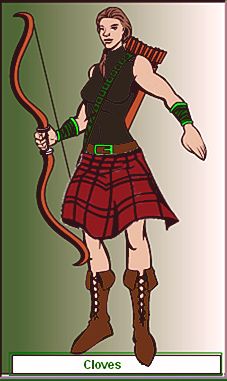
me in the comics
oh god I wish I had a body like this....*sigh*
had to do a bit of cutting and pasting to get a kilt to fit on the female figure...but I think it's alright. Here's hoping Hamish thinks my leathers match enough. 
-
-
9th April 06, 05:58 PM
#9
This is bad, really bad. I love it!
Glen McGuire
A Life Lived in Fear, Is a Life Half Lived.
-
-
10th April 06, 07:31 AM
#10
That site is awesome! You can make some pretty cool guys!
-
 Posting Permissions
- You may not post new threads
- You may not post replies
- You may not post attachments
- You may not edit your posts
-
Forum Rules
|
|










Bookmarks